Most of us keep our iPhones with us all the time, while walking, at the gym, in the office, and even in bed. It’s more than just a phone; it’s our digital companion that stores everything from text messages to banking apps. Almost every important part of your life is inside it.
But here’s the surprising part your iPhone is quietly recording exactly where you go, sometimes even the precise spot where you’re standing.
This happens because of a feature called Precise Location. While the goal is to make apps smarter, it also means you might be sharing way more of your life than you realise.
Let’s break down what this feature really does, why it matters, and how you can take control without losing convenience.
What Is “Precise Location”?
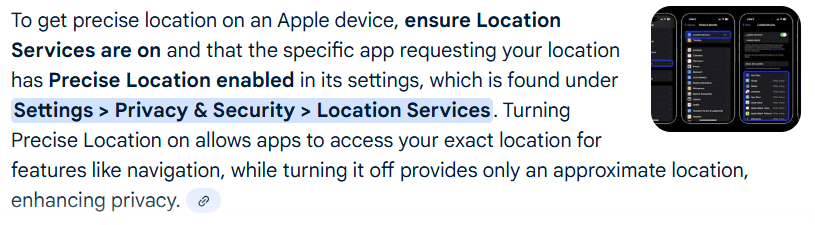
When you install a new app – say Instagram, Uber, or a weather app – you usually see a pop-up asking for location access. The options often look like this:
Allow Once
Allow While Using the App
Don’t Allow
But if you look closely, there’s often a small line at the bottom: Precise Location: On.
That little toggle is the key.
If it’s on, the app doesn’t just know you’re in Chicago – it knows you’re sitting at a coffee shop on 3rd Street and Main Avenue at 8:50 AM.
It can even pinpoint your home, office, or the exact room you’re in.
If you turn it off, the app only gets your approximate location – meaning it knows the city or neighbourhood, not your exact address.
Why Does This Matter?
At first, you might think, so what? Apps like Google Maps won’t work properly without exact location.
True. But not every app actually needs your precise location.
Weather apps don’t need your front porch, they just need your city.
Shopping apps don’t need your bedroom, they just need your ZIP code.
Social media apps don’t need your exact standing spot, just the neighbourhood or city.
Still, many apps pressure you into keeping Precise Location on. Once you allow it, they can start building a detailed profile of your habits.
Real-Life Risks
Scenario 1: Sharing a photo
You post a picture of your dog in your backyard on Instagram. Hidden inside that photo is EXIF metadata, a file that can include the exact location where the photo was taken. If you don’t remove it, someone could find your home address.
Scenario 2: Unnecessary apps
You download a coupon app that promises nearby deals. It asks for a precise Location and you allow it. Now it knows you went to Target at 6:12 PM and then stopped at a pharmacy afterward. That data can be sold to advertisers or data brokers.
In both cases, your everyday life is being quietly exposed.
What Privacy Experts Say
Privacy experts call location data “the most sensitive personal information”. Why? Because it doesn’t just reveal where you are, it reveals who you are.
Your daily commute reveals your workplace.
Frequent visits to a hospital hint at health conditions.
Attending a place of worship or a political rally exposes personal beliefs.
Even your favourite restaurants show your lifestyle.
Sure, you might trust Apple. But not every app developer protects your privacy the same way.
Apple’s Role: Helpful or Tricky?
To be fair, Apple does give you control, the Precise Location toggle is proof.
But here’s the catch: by default, it’s often switched on. Most people don’t notice.
It’s like signing up for a free trial and realising auto-renewal was checked ahead of time. Technically, you had a choice, but was it made obvious? Not really.
How to Check and Change Your Location Settings
The good news? You don’t need to be a tech expert to fix this.
1. Open Settings on your iPhone.
2. Go to Privacy & Security.
3. Tap Location Services.
LETEST POST – Google Stock 2015 vs 2025: Could $10K Have Made You a Millionaire?
4. You’ll see a list of apps using your location.
5. Tap any app to view its permissions.
6. If Precise Location is on but not needed, turn it off.
Which Apps Actually Need Precise Location?
Needed for:
Google Maps or Apple Maps (for accurate directions)
Uber, Lyft (to find your pickup spot)
Food delivery apps (to drop food at your door)
Fitness tracking apps (to map your run or walk)
Not needed for:
Weather apps (city is enough)
Shopping apps (ZIP code is enough)
Social media apps (the general area works fine)
News apps (just need your region)
A Fun Test
Try this: turn off Precise Location for all non-essential apps for one week.
You’ll notice:
Weather apps still give forecasts.
Instagram still lets you tag “New York City”.
Shopping apps still deliver your orders.
Only navigation or delivery apps may ask for it, then you can temporarily turn it back on.
The Bigger Picture: Why Privacy Matters
In today’s world, data is the new gold. Companies don’t just want to know what you buy, they want to know where you buy it, how often you go there, and what you do afterward.
In 2023, the FTC took action against a company that sold sensitive location data collected from visits to reproductive health centres and religious sites. That shows how valuable and risky this data can be.
So turning off Precise Location for unnecessary apps isn’t an overreaction. It’s just basic digital hygiene.
Final Thoughts
Your iPhone is an incredibly powerful tool. But with that power comes responsibility, the responsibility to protect yourself.
Precise location can be useful, but not every app deserves it.
READ MORE – iOS 26 Update: New Features, Pros & Cons, and Should You Upgrade?
Think of it this way: there’s a huge difference between giving someone your city name and handing them a map of your living room. Most of the time, the city name is more than enough.
So tonight, take five minutes to check your iPhone’s Location Services. Turn off Precise Location for apps that don’t need it.
Because in the end, privacy isn’t about hiding something, it’s about keeping control of your own story.